
As membership organizations, associations, and nonprofits continue to elevate their digital portal strategies, platform performance and maintainability take center stage. Fonteva Platform 16 (FP16) marks a major architectural milestone. By migrating core portal experiences from legacy Aura components to Salesforce Lightning Web Components (LWC), FP16 delivers faster page load speeds, superior mobile responsiveness, and alignment with Salesforce’s long-term roadmap.
Whether you are preparing your sandbox, evaluating business risks, or planning staff training, this definitive guide covers everything new in FP16, breaking changes, and the exact step-by-step upgrade procedure.
1. What's New in Fonteva Platform 16
Community Store Enhancements
The LWC-rebuilt Community Store delivers an upgraded e-commerce experience designed to increase engagement and streamline member purchasing.
- FON Display Messages: Surface announcements, promotions, and notifications across Community Site pages. Features rich text formatting, configurable active-date windows, audience segmentation controls, and optional background wallpaper images.
- Modernized Cart and Checkout Experience: Built entirely on LWC and configured through Experience Builder. Assembled using standard components: FON Combo Store Shopping Cart, FON Checkout Button, and FON Accordion Checkout, with built-in support for Guest Checkout.
- Parent-Child Item Variations: Group item variations under a single Parent Item. Shoppers select a Parent Item to reveal its Child Item variations on the Product Detail page. Only Parent Items need to be assigned to a Catalog; Child Items display automatically.
- Automated Recommended Items: Surface cross-sell suggestions on Product Detail pages by tagging Items with Topic and Topic Assignment records.
- Product Reviews and Ratings: Collect consumer ratings and written feedback directly on store products. Activated via the Enable Reviews field on the Store record and managed through individual Review records. Reviews require Published status to display, and the system dynamically calculates an Average Review Score per Item.
- Multi-Media Carousels: Link multiple product images and video URLs to a single Item for carousel display. (Media must be uploaded to a public Media Collection prior to use).
- Additional Information Tabs: Add up to three customizable informational tabs (e.g., “Syllabus”, “CEU Details”) on Product Detail pages. Unlabeled tabs stay hidden, and Child Items inherit Parent tab content by default.
- PDF Document Previewer: Populate the Preview PDF URL field on an Item record to surface a FON PDF Viewer Button, allowing visitors to view sample chapters or agendas in a new browser tab.
- Featured Catalogs and Priority Ordering: Highlight up to two Featured Catalogs at the top of the Store (one public, one gated by Access Permissions). Use the numerical Priority field to control item sequence within catalogs before defaulting to alphabetical sorting.
- Expanded Store Controls: Two new fields enrich the Store record: Enable Reviews (activates product ratings) and Price Display Override Options (controls display attributes for prices and discounts).
Community Site Administration and Analytics
- Google Analytics 4 (GA4) and GTM Integration: Tracks key portal interactions, including Store browsing, Product Details, Cart, Checkout, and Journey flows, and pushes events to GA4 via Google Tag Manager with traffic-source attribution.
- Updated Site Page Templates: Ships with refreshed default pages and templates. Existing sites must be updated once after upgrading to adopt new templates while preserving custom pages.
- Comprehensive Community Site Styling Guide: Introduces official documentation for styling LWC Experience Cloud sites using three distinct methods:
- Experience Builder Theme Panel (Recommended for site-wide branding)
- Component Properties in Experience Builder (For local component layout)
- Head Markup (Deprecated)
IMPORTANT DEPRECATION NOTE: Head Markup targeting legacy Aura component styles is officially deprecated. Organizations using Head Markup should transition site styles to the Theme Panel or Component Properties before future releases.
- Rebuilt LWC Member Profiles: Faster page performance with granular styling controls via Experience Builder.
- Dedicated Company Administrator Dashboard: A centralized portal space for corporate account leads to manage company rosters, orders, active memberships, and related data.
Member Journey (Guided Enrollment)
Replaces legacy Visualforce/CPBase Join Processes with a multi-step membership enrollment wizard hosted on a single page using Salesforce Screen Flows and Fonteva LWC components. The workflow dynamically adapts based on the order, showing only relevant steps (packages, forms, donations) for both guest and logged-in visitors.
Phase 1: Pre-Implementation and Scoping
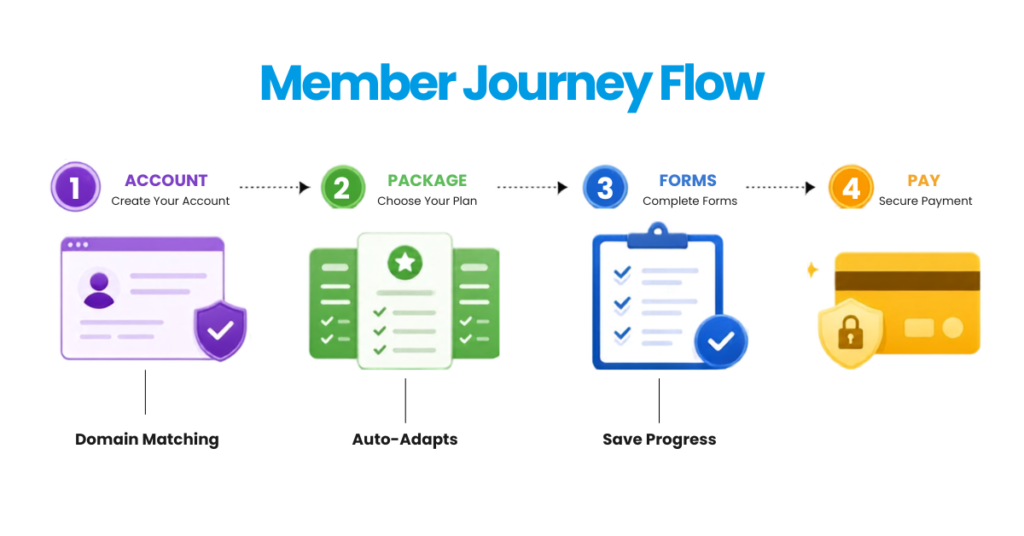
- Save Progress: Visitors can pause enrollment and safely resume later.
- Progress Bar: A vertical progress indicator keeps applicants informed of their location in the flow.
- Donation Integration: Seamlessly prompts for an optional campaign gift during membership registration.
- Domain Matching: Automatically validates and links guest applicants to their employer’s corporate account based on email domain.
- Admin Flexibility: Includes a prebuilt template that administrators can clone, customize, or build from scratch.
Auditability, Awards and Platform Enhancements
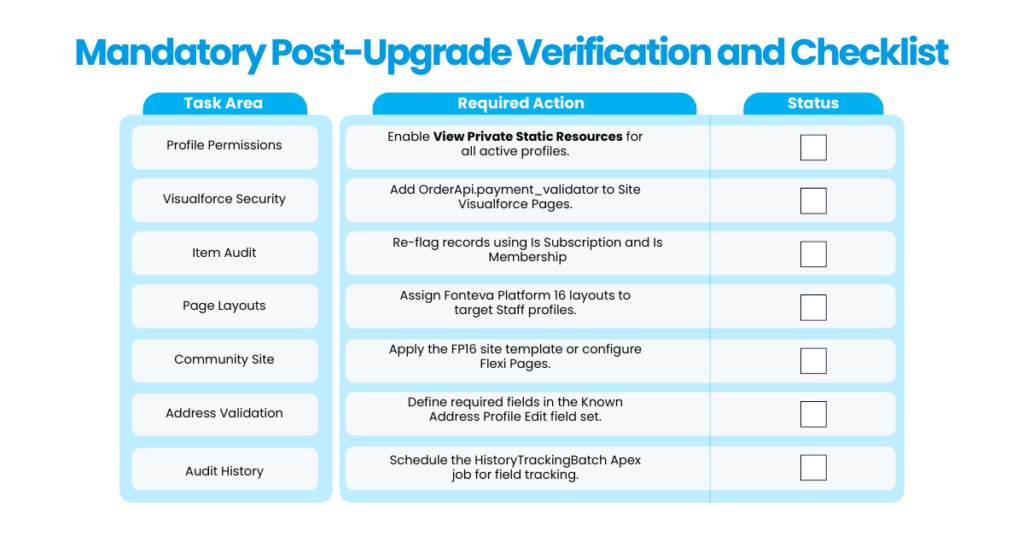
- Configurable Field Change History Tracking: Extends Salesforce’s native 18-month field history retention limit indefinitely. Employs three custom objects and a scheduled daily Apex batch job (HistoryTrackingBatch) to capture full before/after values, timestamps, and user IDs.
- Awards and Recognition Tracking: Log honors, service recognitions, and grants against Accounts and Contacts using new Awards and Award Types objects. Simply add the Awards related list to standard page layouts.
What's Changing and Operational Adjustments
|
Feature Area |
Change Summary |
Required Admin Action |
|
Spark Plug Customization |
Architecture update |
Review Spark Plug customizations for compatibility; update Navigation Properties to target custom component pages. |
|
Events Listing Experience |
LWC Rebuild (FON – Events page) |
Configure event browsing via Large Tile, Small Tile, Enhanced List, or Geo-Location layouts using FON Events Landing and FON Featured Events Carousel. |
|
Subscriptions vs. Memberships |
New Is_Membership__c schema field |
Mandatory Post-Upgrade Audit: Re-mark Item records! Subscriptions = Check Is Subscription. Memberships = Check BOTH Is Subscription AND Is Membership. |
|
Seasonal Address Support |
Active date-range windows |
Set date windows on Known Addresses. When active, it becomes the Contact’s Current Address. Assign required fields manually in the Known_Address_Profile_Edit field set. |
|
Fundraising and Campaign Pages |
Flexible recurring payment dates |
Enables a donor-facing “Debit/Charge My Account on This Day” option for monthly recurring gifts. |
|
Credit Memo Security |
New Is_Restricted__c field |
Setting Is_Restricted__c = true hides the credit memo from the front-end Apply Payment screen while preserving API and backend access. |
|
Form Components |
Legacy Aura components deprecated |
Update all Community Site pages displaying legacy forms to use the modern FON Form LWC component. |
How Aplusify Simplifies Your Fonteva Platform 16 Upgrade
Upgrading to Fonteva Platform 16 is a major architectural milestone. Migrating from legacy Aura components to Lightning Web Components (LWC), auditing item schemas, and refactoring site styles require dedicated Salesforce expertise and careful technical execution.
As a certified Salesforce and Fonteva implementation partner, Aplusify helps associations and nonprofits navigate the FP16 transition smoothly, minimizing risk and ensuring zero disruption to member experiences.
FAQs
Answer: FP16 re-architects core portal features (Store, Checkout, Profile, Join Process) onto Salesforce Lightning Web Components (LWC). This provides significantly faster page rendering, improved mobile responsiveness, higher security via Lightning Web Security, and long-term technical alignment with Salesforce’s core roadmap.
Answer: FP16 is the final release supporting custom Aura components. While legacy Aura components may still function temporarily in FP16, they will be removed in subsequent versions. Organizations with custom Aura code must develop an LWC migration roadmap now, as Fonteva does not provide automated Aura-to-LWC code translation tools.
Answer: Legacy Join Processes are replaced by Member Journey, a flow-driven wizard powered by Salesforce Screen Flows and Fonteva LWCs. Member Journey adds capabilities like Save Progress, vertical progress tracking, domain matching for corporate accounts, and integrated campaign donation prompts.
Answer: FP16 introduces the Is_Membership__c field to distinguish memberships from standard subscriptions. Administrators must audit Item records post-upgrade and set both Is Subscription = TRUE AND Is Membership = TRUE for membership products. Standard subscriptions should only have Is Subscription = TRUE.
Answer: Direct upgrades to FP16 require Fonteva Platform 15.1 or later. Environments running older releases (such as 21Winter) must first upgrade to the latest 15.1 patch release before deploying FP16. Always complete and test upgrades in a Sandbox environment first.
Author Bio
- Preeti Deepa Dash
- Marketing Operations and Revenue Expert, Aplusify
Preeti Dash is a marketing professional at Aplusify with 7 years of experience in technology marketing and communications. She works closely with associations and nonprofits to simplify the value of Salesforce and AMS solutions through strategic storytelling and educational initiatives, helping organizations navigate digital transformation and enhance member engagement.