
NPSP is Salesforce’s managed-package nonprofit solution, while Agentforce Nonprofit is Salesforce’s current nonprofit platform, formerly called Nonprofit Cloud. Salesforce says NPSP remains fully supported but is no longer receiving direct development of new features or enhancements. For Salesforce admins, the major practical difference is the data model: people, relationships, fundraising, programs, reporting, and some automation patterns are structured differently. An NPSP migration therefore requires discovery, object mapping, dependency analysis, data planning, and redesign not simply an export and import.
NPSP vs Agentforce Nonprofit: Key Differences
Area | NPSP | Agentforce Nonprofit |
Platform Architecture | Delivered as managed packages on Salesforce | Salesforce’s current nonprofit platform, formerly called Nonprofit Cloud |
People & Relationships | Commonly uses Contacts and Household Accounts | Uses Person Accounts, business accounts, and relationship objects |
Fundraising | Commonly centers on Opportunities and related NPSP structures | Provides purpose-built fundraising objects such as Gift Commitment and Gift Transaction |
Program Management | PMM-based implementations may use specific program and service objects | Uses a different program and engagement structure, requiring object and automation mapping during migration |
Customizations & Automation | Custom fields, flows, Apex, reports, dashboards, and integrations may depend on NPSP structures | Migration requires reviewing and mapping these dependencies to the new architecture |
Migration Considerations | Existing NPSP data and customizations need to be assessed before moving | Requires a structured review of data, objects, automation, integrations, and business processes |
Why the NPSP vs Nonprofit Cloud Architecture Difference Matters
NPSP is a managed package installed on Salesforce. It extends Salesforce’s standard data model with nonprofit-specific objects, automation, fields, and functionality.
Agentforce Nonprofit uses a different architecture designed specifically for nonprofit operations.
For an admin, the impact shows up in three areas:
1. The objects you work with are different.
The records you’re familiar with in NPSP don’t always have a one-to-one equivalent in Agentforce Nonprofit.
2. Your automations and reports may need to change.
Flows, Apex, reports, dashboards, integrations, and custom fields that depend on NPSP objects need to be reviewed and remapped.
3. Future platform capabilities follow the new architecture.
Salesforce is continuing development around Agentforce Nonprofit while NPSP remains supported without direct feature enhancement development.
For admins, this means migration isn’t simply a matter of moving records from one system to another. It’s a data-model change.
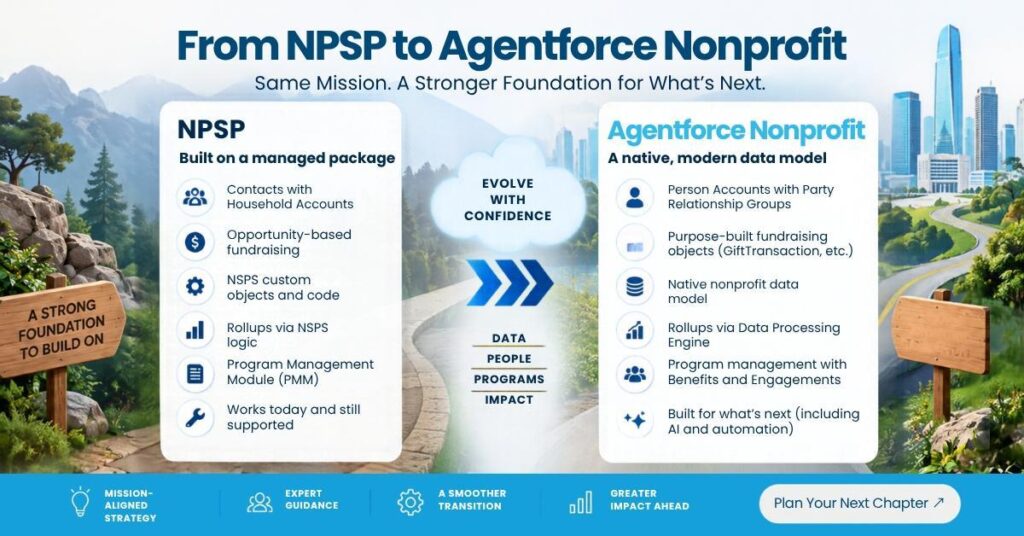
Contacts and Households vs. Person Accounts and Party Relationship Groups
One of the biggest differences you’ll encounter is how people and relationships are represented.
In NPSP, an individual is generally represented by a Contact, with the Contact associated with a Household Account.
Agentforce Nonprofit uses Person Accounts to represent individuals, while groups and relationships can be represented using Party Relationship Groups (PRGs).
That changes how you think about household and relationship data.
During migration, those relationships need to be mapped carefully.
What should you audit?
- Household Accounts
- Contact relationships
- Affiliations
- Personal relationships
- Account and Contact reports
- Record-triggered automation
- Integrations using Account or Contact IDs
If your organization relies heavily on Household Account IDs, expect reporting and integration work as part of the migration.
Opportunity vs. GiftTransaction: Where Does the Donation Live?
In NPSP, Opportunity plays an important role in fundraising. Payments and recurring donations add additional records around that fundraising activity.
Agentforce Nonprofit separates fundraising activity into purpose-built objects.
The important objects include:
- GiftCommitment — represents a pledge or recurring giving commitment.
- GiftTransaction — represents an individual gift transaction.
- GiftDesignation — identifies where a gift is designated.
- GiftSoftCredit — tracks credit associated with someone who influenced a gift.
- GiftRefund — represents a refund.
- GiftTribute — stores tribute and honoree information.
- GiftBatch and GiftEntry — support gift entry and batch processing.
- DonorGiftSummary — provides summarized donor gift information.
Opportunity doesn’t disappear completely. It can still be used where a pipeline-based sales process makes sense, such as major gifts, grants, or planned giving.
The important difference is that fundraising transactions are no longer centered around Opportunity in the same way they are in NPSP.
How Recurring Gifts and Pledges Change
Recurring giving is another area that deserves special attention during migration.
In NPSP, a recurring donation can generate individual opportunities over time.
In Agentforce Nonprofit, the recurring commitment and the individual transactions are separated.
The basic concept is:
Recurring commitment → GiftCommitment → GiftCommitmentSchedule → GiftTransactions
During discovery, identify every report, flow, integration, and dashboard that references Recurring Donation, Opportunity, Payment, Installments, Pledge, and Soft Credit.
Soft Credits Have Their Own Structure
Soft credits are particularly important for organizations with sophisticated fundraising programs.
In NPSP, soft-credit information is connected to fundraising records through the NPSP model.
Agentforce Nonprofit provides GiftSoftCredit as a dedicated object.
For migration planning, don’t just move the donation amount. You also need to understand who receives credit for the gift and why.
Program Management: PMM vs. Agentforce Nonprofit
If your organization uses the Salesforce Program Management Module alongside NPSP, the migration becomes more than a fundraising exercise.
Several familiar concepts change:
- Service → Benefit
- Program Engagement → Program Enrollment
- Service Schedule → Benefit Schedule
- Service Session → Benefit Session
- Service Delivery → Benefit Assignment
- Client Notes → Interaction Summary
- Case Plan → Care Plan
The important part isn’t simply that the names are different. The underlying structure and reporting approach also change.
One example is Benefit Assignment. Instead of only recording that a benefit was delivered, the new model can support the idea of a benefit assigned to someone before the actual delivery occurs.
If your organization relies heavily on PMM, every report, flow, integration, and automation built around those objects should be included in migration discovery.
Rollups Work Differently
This is one of the changes Salesforce admins and fundraising teams should understand before migration.
NPSP is known for its rollup functionality, where fundraising activity can update summary information on related records.
Agentforce Nonprofit uses the Data Processing Engine (DPE) for many of these calculations.
A value that previously appeared almost immediately may depend on a scheduled or configured data processing process.
For admins, the key question isn’t simply “Does the new system have rollups?” It is: “Which rollups do we need, what calculates them, and when does that information become available?”
Before go-live, document existing NPSP rollups, custom rollup fields, dependent reports and dashboards, automations, integrations, and business processes that expect real-time totals.
What Happens to Your Reports?
This is where the object-level differences become very real.
If your current reports are heavily dependent on Opportunity, Contact, Household Account, Payment, or NPSP rollup fields, they will need to be reviewed.
Your new reporting model may pull information from GiftTransaction, GiftCommitment, GiftDesignation, GiftSoftCredit, DonorGiftSummary, Program Enrollment, and Benefit Assignment.
The goal shouldn’t be to recreate every old report exactly as it was. Migration is a good opportunity to ask: Which reports do users actually need today?
Some reports may be obsolete. Others may need to be redesigned around the new data model.
Why the Data Model Matters for AI
This is one of the bigger strategic differences between NPSP and the newer Salesforce nonprofit architecture.
AI needs access to reliable, structured data.
If information about a donor, gift, program enrollment, or benefit is stored differently from one organization to another, building repeatable AI experiences becomes more complicated.
A standardized data model provides a more consistent foundation for new nonprofit-specific capabilities.
You’re not just deciding where your records will live. You’re deciding what your CRM foundation will look like for future automation, analytics, and AI initiatives.
Aplusify also works with nonprofits and associations on AI and analytics initiatives that connect data readiness with practical business use cases.
What Should You Do Before Migrating From NPSP?
You don’t need to start by rebuilding your entire Salesforce org. Start with discovery.
1. Inventory your NPSP dependencies
Document custom objects, custom fields, flows, Apex, reports, dashboards, integrations, NPSP configurations, and PMM dependencies.
2. Review your fundraising model
Pay particular attention to recurring donations, pledges, payments, soft credits, tributes, gift designations, matching gifts, and grant-related fundraising.
3. Review your people and relationship data
Understand how your organization currently uses Contacts, Household Accounts, affiliations, relationships, and organizations.
4. Audit your reporting
Identify the reports that leadership, fundraising, finance, and program teams actually use. Don’t automatically rebuild everything.
5. Plan the new data model before migration
Person Accounts, fundraising objects, program objects, relationships, and rollups should be part of the design conversation before data migration begins.
6. Think about your future requirements
If your organization wants better analytics, automation, or AI capabilities, include those requirements during the planning stage.
Does Moving From NPSP Mean Starting Over?
Not necessarily.
It does mean that you need a clear understanding of your existing Salesforce environment before making the move.
The right starting point is a migration assessment or discovery exercise.
That should answer questions such as:
- What NPSP functionality are we actually using?
- How much custom development do we have?
- Which integrations need to be rebuilt?
- How complex is our fundraising data?
- How heavily do we use PMM?
- What happens to our reports and dashboards?
- Do Person Accounts make sense for our organization?
- What should we clean before migration?
- What should we redesign rather than migrate?
- What does the future-state Salesforce architecture look like?
Aplusify helps nonprofits evaluate these questions as part of a structured Salesforce Nonprofit Cloud implementation and migration strategy.
For organizations specifically evaluating the move from NPSP, Aplusify also provides Nonprofit Cloud conversion services.
Final Takeaway
If you’re running NPSP today, there is no need to treat migration as an emergency.
Salesforce says NPSP remains supported, while direct feature and enhancement development has moved on.
That gives Salesforce admins time to plan properly.
Use that time to understand your current architecture, identify dependencies, clean up your data, and determine what your organization actually needs from its next Salesforce environment.
The most important question isn’t “Should we migrate from NPSP?” It’s: “What would migration mean for our data, users, integrations, reports, and future roadmap?”
Once you can answer that, the migration decision becomes much easier to scope.
If you want to evaluate your current environment, talk to Aplusify about a Salesforce nonprofit migration assessment.
Frequently Asked Questions
Yes. Salesforce says NPSP remains fully supported, so existing organizations can continue using it and receive Salesforce support. Salesforce also says NPSP is no longer receiving direct development of new features or enhancements, which it calls “End of Innovation.”
Salesforce does not describe NPSP as immediately discontinued for existing organizations. It says existing NPSP organizations are not required to migrate until they are ready, while new nonprofit innovation is focused on Agentforce Nonprofit.
Agentforce Nonprofit is Salesforce’s current name for its nonprofit platform, formerly called Nonprofit Cloud. It includes capabilities for areas such as fundraising, program management, case management, and outcome management.
The biggest practical difference for Salesforce admins is the data model. People, relationships, fundraising, program management, and related records are structured differently, so migration requires object mapping, automation review, reporting changes, and data-quality planning.
Yes. Agentforce Nonprofit uses Person Accounts to represent individual stakeholders. Salesforce identifies Person Accounts as a significant change for organizations migrating from NPSP.
Opportunity does not simply disappear. Agentforce Nonprofit introduces purpose-built fundraising objects such as Gift Commitment and Gift Transaction, while Opportunity can still support pipeline-oriented processes such as major gifts, grants, or planned giving.
There is no universal timeline. The effort depends on data volume, customizations, integrations, fundraising complexity, PMM usage, reporting requirements, and data quality. A discovery or readiness assessment should be completed before estimating implementation time.
Start with NPSP dependencies, custom fields and objects, fundraising records, relationships, PMM usage, integrations, reports, dashboards, automations, data quality, and future requirements for analytics, automation, and AI.
Author Bio
- Vikash Kadyan
- Assistant Marketing Manager
Vikash is assistant marketing manager at Aplusify, dedicated to helping nonprofits modernise their tech stack and unlock next-generation fundraising capabilities.